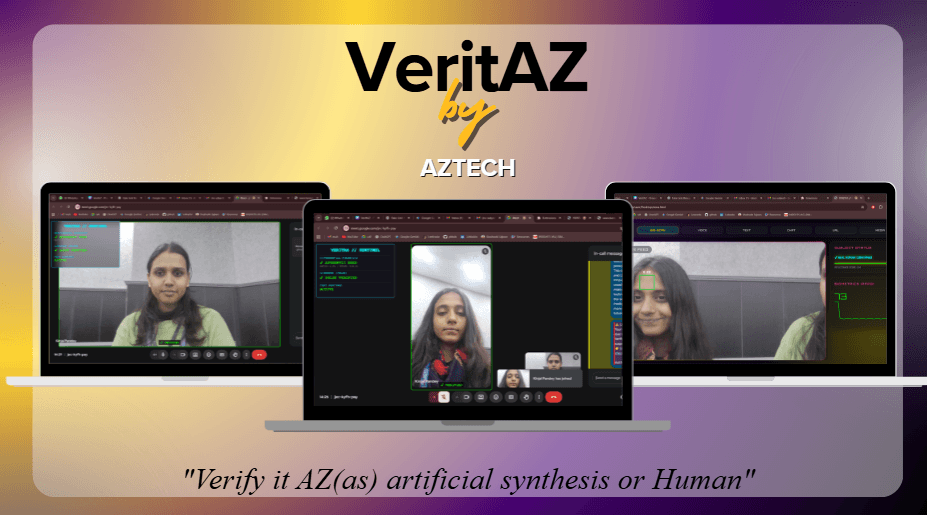
VeritAz
VERIfy IT AS: Real or Fake.


The problem VeritAz solves
VERITAZ
"VERify IT Az ai or real"
Most AI detectors are just boring websites where you upload a file and wait. We thought that was useless. If you’re being scammed on a live call or a chat, you don't have time to "upload" anything.
We built VeritAz to be a 6-in-1 "digital bodyguard" that lives inside your browser. It’s a real-time forensic engine that tells you what’s real and what’s synthetic—right as you’re looking at it.
⚡ The Problem (Real-World, not Theoretical)
Deepfakes aren't a "future" threat anymore. People are losing money to AI voice clones and being fooled by synthetic personas on Google Meet today. The problem is that human eyes aren't fast enough to catch the glitches in modern AI, and jumping between five different verification tools takes way too long.
VeritAz centralizes everything into one proactive Sentinel.
🛠️ What it actually does (The 6-in-1 Breakdown)
-
The Google Meet Sentinel (Live HUD)
This is the heart of the project. We injected a neon HUD directly into the Google Meet UI. It uses rPPG technology to scan for "biological life"—specifically, the tiny changes in skin color caused by a human heartbeat. If the person on the screen doesn't have a pulse? VeritAz hits the red alert. -
Media Forensics (The "Blue Channel" Test)
AI-generated images are "too perfect." We isolated the blue color channel to look for synthetic smoothness. Real cameras leave noise; AI leaves a glossy fingerprint. VeritAz finds it. -
Voice Spectral Analysis
Humans need to breathe; AI doesn't. Our analyzer checks audio clips for natural breath pauses and spectral consistency. If the voice is too "perfect" to be human, we flag it as a clone. -
Chat Sentinel (OCR Scanning)
Don’t bother copy-pasting. Just upload a screenshot of a suspicious WhatsApp or Telegram chat. Veritas uses Tesseract.js to read the text and runs a script-check to see if the message matches known scam patterns. -
Text Pattern Recognition
We built a logic gate to catch "AI-speak." It scans for the specific vocabulary and "tapestry" of words that LLMs over-rely on. If it sounds like a corporate robot wrote it, we’ll let you know. -
URL Hazard Trace
It’s more than a link-checker. Veritas deconstructs URL structures to find hidden IP hosts or dangerous TLDs (like .zip or .xyz) that are usually masked to look like legit sites.
⚖️ The "Evidence Protocol"
We didn't want Veritas to just be a warning light. If the extension detects a confirmed scam attempt, it can:
Auto-Record: Capture a high-quality clip of the scammer.
Trace: Ping the connection to get a geolocation lead.
Report: It even auto-drafts an email to cybercrime authorities with the evidence attached.
🔧 Deployment
VeritAz is an Unpacked Extension because it's doing things the standard Chrome Store doesn't usually allow.
Download the repo.
Go to chrome://extensions/ and toggle Developer Mode.
Load Unpacked and select the folder.
Open Google Meet and watch the Sentinel wake up.
🎨 The Vibe
We hated the idea of a boring security tool. Veritas uses a Cyberpunk/Glassmorphism aesthetic—neon accents, frosted glass panels, and CRT scanlines. It’s built to look like a forensic dashboard from the future, because that's where we’re headed.
VeritAz: Because you shouldn't have to guess what's real.
Challenges we ran into
One of the hardest parts of building a "live" tool is that the internet doesn't like it when you try to mess with its UI—especially a platform as secure as Google Meet.
Here are the two biggest hurdles we hit and how we hacked our way around them:
- The "Canvas Injection" Nightmare 🥊
The Challenge: We wanted the Veritas HUD to look like a native part of the Google Meet interface, not just a popup. However, Google Meet uses complex, dynamic div structures that change constantly. Every time we tried to inject our neon-glass dashboard, the Meet UI would "flicker" or the video stream would lag because our pulse-detection script was fighting for CPU cycles.
The Fix: We stopped trying to "force" our HTML into their containers. Instead, we used a Shadow DOM to isolate our extension’s CSS from the site’s CSS. This kept our "Cyberpunk" aesthetic from breaking the Google Meet layout. To fix the lag, we offloaded the heavy rPPG calculations to a Web Worker, allowing the video to stay smooth at 60fps while the "forensic brain" ran in the background.
- The "Breathless" Audio Bug 🎙️
The Challenge: During testing, our Voice Spectral Analysis was throwing tons of "False Positives." It was flagging real people as AI just because they had high-quality microphones or were speaking in a very monotone, professional way (mostly during formal presentations).
The Fix: We realized our "Breath Detection" was too sensitive. We had to recalibrate our algorithm to look for Spectral Flux—the tiny, messy imperfections that happen when a human voice box vibrates. AI voices are mathematically "cleaner" than human ones. By shifting our focus from "pauses" to "micro-imperfections" in the waveform, we made the detector way more accurate and significantly reduced the false alarms.
- Taming the OCR (Tesseract.js vs. Dark Mode) 🌑
The Challenge: When users tried to scan screenshots of WhatsApp or Telegram in Dark Mode, our OCR engine (Tesseract.js) went blind. The low contrast between the text and the dark background made the detection accuracy drop to about 30%.
The Fix: We implemented a Pre-Processing Pipeline. Before the text is read, Veritas now automatically applies a grayscale filter and increases the contrast of the screenshot internally. It basically "flips the lights on" for the AI so it can read the text clearly, regardless of whether the user is a Dark Mode lover or not
The Lesson: Building a 6-in-1 system taught us that "perfect" is the enemy of "live." We learned to optimize for speed and real-world conditions (like bad lighting or dark mode) rather than just building for a perfect laboratory environment.
Tracks Applied (1)
Open Track
Technologies used